Returning to Blogging
When I last wrote a blog post, months ago now, I had grand ambitions of writing them more often. This blog exists, in part, to better document my programming journey. I also want to help others with small, niche problems from studying, documenting, and preserving older or smaller authoring tools. I will still sometimes write guides or tutorials on handling common issues. Yet, my primary focus for 2025 is to blog about development. This focus includes the tools I manage. It also involves research I do related to authoring tools. These tools include ink, Twine, Bitsy, and Ren’Py.
Background of libtwee
Before my current teaching job, I would often teach web development. The focus was on JavaScript programming or game design with an emphasis on pseudo or limited code. Over the last few years, I’ve been teaching Unity development more. I have had to slowly shift my mindset. My focus has moved from code designed for a web browser to more desktop-oriented approaches. At the end of this past semester, I realized I often struggled to “think in C#.” I decided I needed to improve my own skills. Because I was already working on Twine formats, I created a new library named libtwee.
libtwee is a stand-alone library. It works with Twine formats in C#. It can also be used in other potential projects based on the .Net family of languages. Instead of command-line support, as Extwee has, libtwee, is simply a “library.” It assumes the data comes from another interface or library. It tries to parse and return specific objects matching some type.
As I type this, preliminary support for multiple formats is already in the library. It can handle parsing Twine 1 HTML, Twine 2 HTML, and Twine 2 JSON. I wanted to add Twine 1 TWS (Python pickle) support. I have given up on adding parsing support for what I hope is the upcoming 1.0 release in the coming weeks once output support is added for the same general parsing formats.
C# and JSON Issues
After working through adding JSON parsing support recently, I knew I wanted to write a blog post on this topic. Working with JSON in C# was much harder than I expected. I believe my own solution, based on internet research, will help others with similar problems.
Twine and JSON
Let’s start with some background on Twine. In the Twine ecosystem, we call the thing people and tools most commonly interact with a “story.” This is not the smallest unit, but it is the most common. When people play something created in Twine, it is called a “story” from a metaphorical perspective. Twine organizes what is output using this term.

Figure 1. Screenshot of Story Listing Interface in Twine 2 (from Twine 2.10)
In 2023, I wrote most of what is now called the Twine 2 JSON Specification. This describes how stories can be encoded in JavaScript Object Notation (JSON) for use with other tools in the ecosystem. The specification captured the work of both myself and others. We were trying to store stories as data in the JSON format. We hope it helps standardize what data is saved. It also helps with what to expect when encountering Twine 2 story data in the format.
{
   "name": "Example",
   "ifid": "D674C58C-DEFA-4F70-B7A2-27742230C0FC",
   "format": "Snowman",
   "format-version": "3.0.2",
   "start": "My Starting Passage",
   "tag-colors": {
     "bar": "green",
     "foo": "red",
     "qaz": "blue"
   },
   "zoom": 0.25,
   "creator": "Twine",
   "creator-version": "2.8",
 }
Code 1. Example of Twine 2 JSON Data
When I wrote the Twine 2 JSON Specification, I was also working on my JavaScript tool Extwee. Of course, when working in JavaScript, JSON is very helpful. Data can be quickly captured into its “notation” and saved or transferred in some way. When reading a file containing JSON data, concerting it back into JavaScript values is often relatively fast. Once the Specification was published, I quickly published my own support for it in Extwee.
C# and JSON
I have what I would describe as a “good” knowledge of how to write code in C#. Yet, there are some aspects I have never touched. I learned quickly that JSON work in C# is both straightforward and not straightforward. It depends, as I have found, on how closely you match the expectations of how C# understands objects.
When converting in-memory collections of values into other formats, C# understands two processes named serialization and deserialization. Within the language of C#, an object can be converted into another, storage format through serializing it. Because C# works at the object level, serialization happens based on exposed properties of the object. C# converts the object and its public data. It follows rules to keep the opposite process, deserialization, as correct as possible. Ideally, converting data into one format and back into in-memory values should produce the same values with the same names. Serialization and deserialization should work together to produce a format and parse the same format.
The first obstacle I encountered was in conflicting naming conventions. C# has a naming convention based on an earlier language named Pascal more commonly called PascalCase. Properties of objects should start with capital letters. As shared as part of Code 1, the properties of the notation do not start with capital letters. This is also explained in the Twine 2 JSON specification. When matching the C# naming convention, my code of representing stories as a Story class does.
namespace libtwee
{
    public class Story
    {
        public string Name { get; set; }
        public string IFID { get; set; }
        public string Start { get; set; }
        public string Format { get; set; } = string.Empty;
        public string FormatVersion { get; set; } = string.Empty;
        public float Zoom { get; set; }
        public List<Passage> Passages { get; }
        public string Creator { get; set; } = string.Empty;
        public string CreatorVersion { get; set; } = string.Empty;
    }
}
Code 2. Partial Class Definition of C# Story Class from libtwee
Because C# prefers deserialization to happen at the object level, this created a major problem for me. The names of the properties of the JSON Specification did not match my class. They also did not follow the general naming convention of C# properties. To correctly parse incoming JSON, I had to turn to a trying-and-parsing approach.
The TryGetValue() Approach
Deserialization in C# supports an approach known as try-get-value based on the same method of a more generalized collection. The reason for this is simple. In some situations, incoming data may not contain properties. The only way to find out is to “try” to get it. If the data is found, you can then do something with it.
My code did not match the naming convention. My new parsing code needed to “try” with each possible property. Then it handled the value, if found. For some simple values, this produced somewhat silly but necessary code to deal with different possible data types. If a value was not a null value, then the code converted the data into a string value. Otherwise, it assumed an empty string value.
// format: (string) Optional. The format of the story.
story.Format = data.TryGetValue("format", out object? formatValue) ? formatValue?.ToString() ?? "" : "";

// format-version: (string) Optional. The version of the format.
story.FormatVersion = data.TryGetValue("format-version", out object? formatVersionValue) ? formatVersionValue?.ToString() ?? "" : "";

// start: (string) Optional. The name of the starting passage.
story.Start = data.TryGetValue("start", out object? startValue) ? startValue?.ToString() ?? "" : "";
Code 3. Selection of Code from Parsing of Twine 2 JSON in libtwee
For simpler properties like format and format-version, the “try” approach works well. If we find it, we use the resulting string value. For more complex data structures, this became much more of a struggle. This became the second major problem for me to overcome.
A good example of this complexity can be found in understanding tag-colors. In JSON format, the collection of tag-colors can contain none, one, or any number of pairs of names and values. When used in Twine 2, the name value is the “tag” and the value is the “color” applied to it. For example, if a tag has the color value “red”, a red line will be shown the passage. You can see this when viewed in Twine 2.
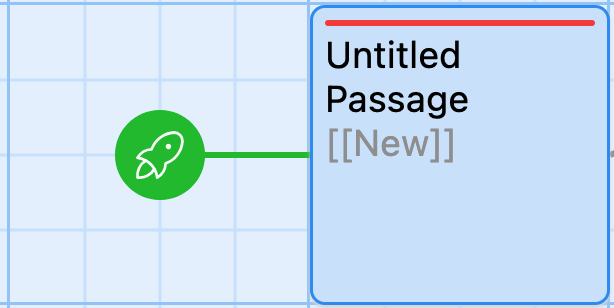
Figure 2. Screenshot of a Passage with Tag Color in Twine 2 (from Twine 2.10)
A story in Twine 2 can have many tags. One or more of these tags can have colors. If a tag has a color, it is represented in a collection as part of the JSON data.
"tag-colors": {
    "bar": "green",
    "foo": "red",
    "qaz": "blue"
  }
Code 3. Code Selection of tag-colors JSON Collection
In C#, the “try” approach works well for simple value. For more complex data, the resulting data can be some object. This can be a collection or not. The property should be checked if it is an object (which implies it could be a collection). Next, code should try to access any of its parts through a process called enumeration. Put another way, verify if the property exists. If it holds internal data with names, then it should be parsed as possible tag colors.
Here is the code I have developed:
// Test if the tag-colors key exists in the data dictionary.
 if(data.TryGetValue("tag-colors", out object? tagColorsValue)) {
   // Create empty KeyValuePair collection to store the tag-colors.
   Dictionary<string, string> tagColors = [];

     if (tagColorsValue is JsonElement tagColorsElement && tagColorsElement.ValueKind == JsonValueKind.Object)
     {
         foreach (JsonProperty item in tagColorsElement.EnumerateObject())
         {
             // Add the tag-colors to the story object.
             story.TagColors.Add(item.Name, item.Value.GetString() ?? "");
         }
      }
      else
      {
          // If tag-colors is not a collection, produce a warning and skip data.
          Console.WriteLine("WARNING: tag-colors is not a collection. Ignoring data.");
       }
 }
Code 4. Selection of C# Code Showcasing Handling Complex JSON Data Structures
As the earlier code demonstrates, this process can become very complex quickly even for seemingly simple data collections like tag-colors. While it is not included in this blog post, the code for parsing Passage data is equally complicated. This code handles the smallest unit in the Twine ecosystem.
Looking ahead
It took me much longer than I expected to figure out how to parse Twine 2 JSON. I am happy with the current results. The existing code should cover most common cases.
As I write this, the current loose plan is to release version 1.0 of libtwee in the coming weeks. I hope things work out. Hopefully, by the end of January 2025, I would also like to get it registered on NuGet.
 Digital Ephemera